

Before you start
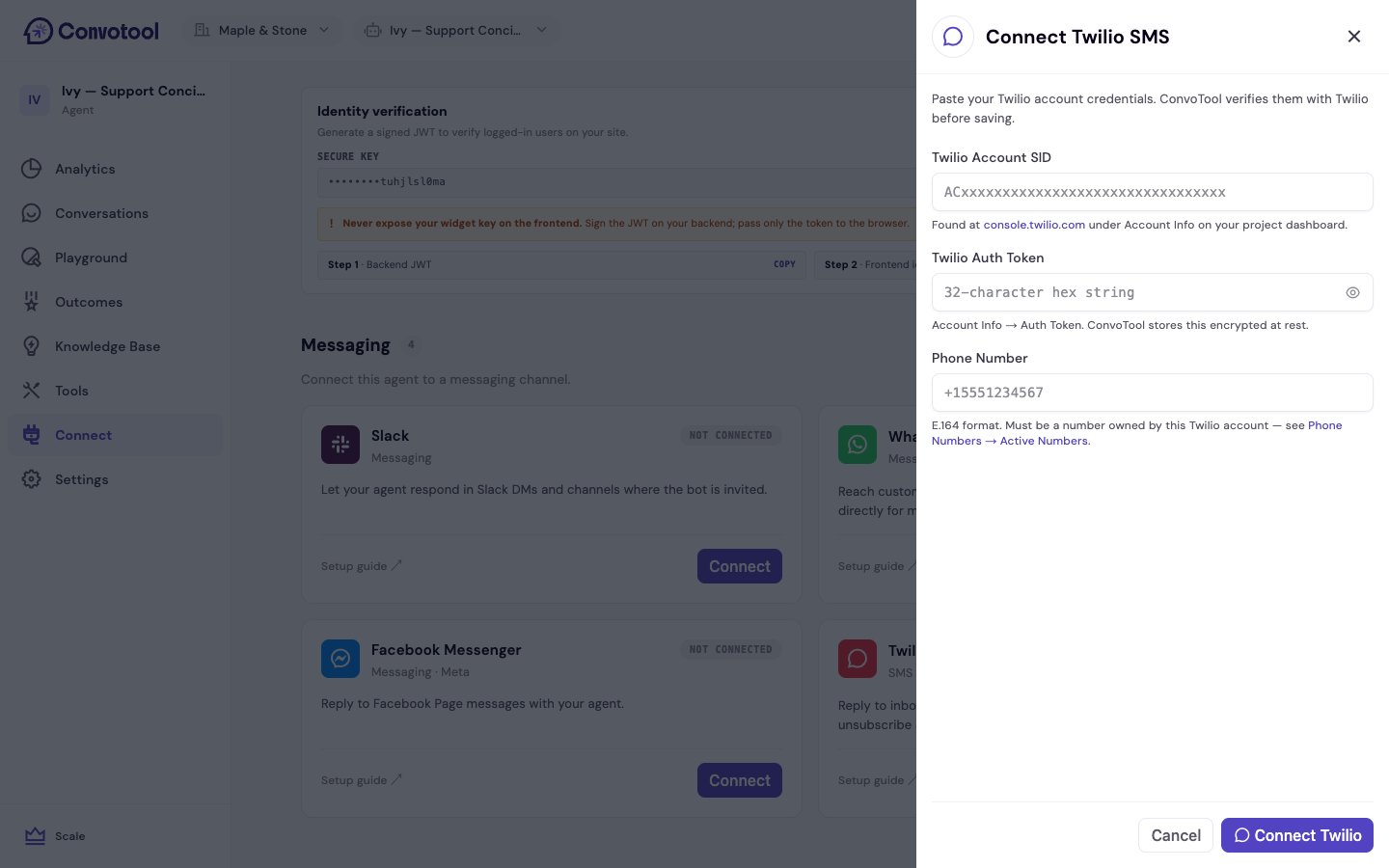
You’ll need, from your Twilio Console:- Your Account SID (starts with
AC, found under Account Info) - Your Auth Token (under Account Info)
- A phone number you own in Twilio, in E.164 format (e.g.
+15551234567)
Connect Twilio SMS
1
Open the Connect page
Select your agent, click Connect in the sidebar, and find Twilio SMS in the Messaging section. Click Connect.
2
Enter your Twilio credentials
Paste your Account SID, Auth Token, and phone number. ConvoTool verifies the credentials with Twilio before saving and stores your Auth Token encrypted at rest.
3
Configure the inbound webhook in Twilio
After connecting, ConvoTool shows a webhook URL. In the Twilio Console:
- Open Phone Numbers → Active Numbers and click the number you connected.
- Under Messaging Configuration, set “A message comes in” to Webhook and paste the URL.
- Leave the method as HTTP POST and save.
Recipients can text STOP to unsubscribe at any time — ConvoTool handles opt-outs automatically.
After connecting
The Twilio SMS card shows the connected phone number. The agent now replies to inbound SMS on that number.Each Twilio number can be linked to one agent. If the number is already connected to another agent, ConvoTool prompts you to Replace and connect.
Back to Messaging channels
See all channel options.